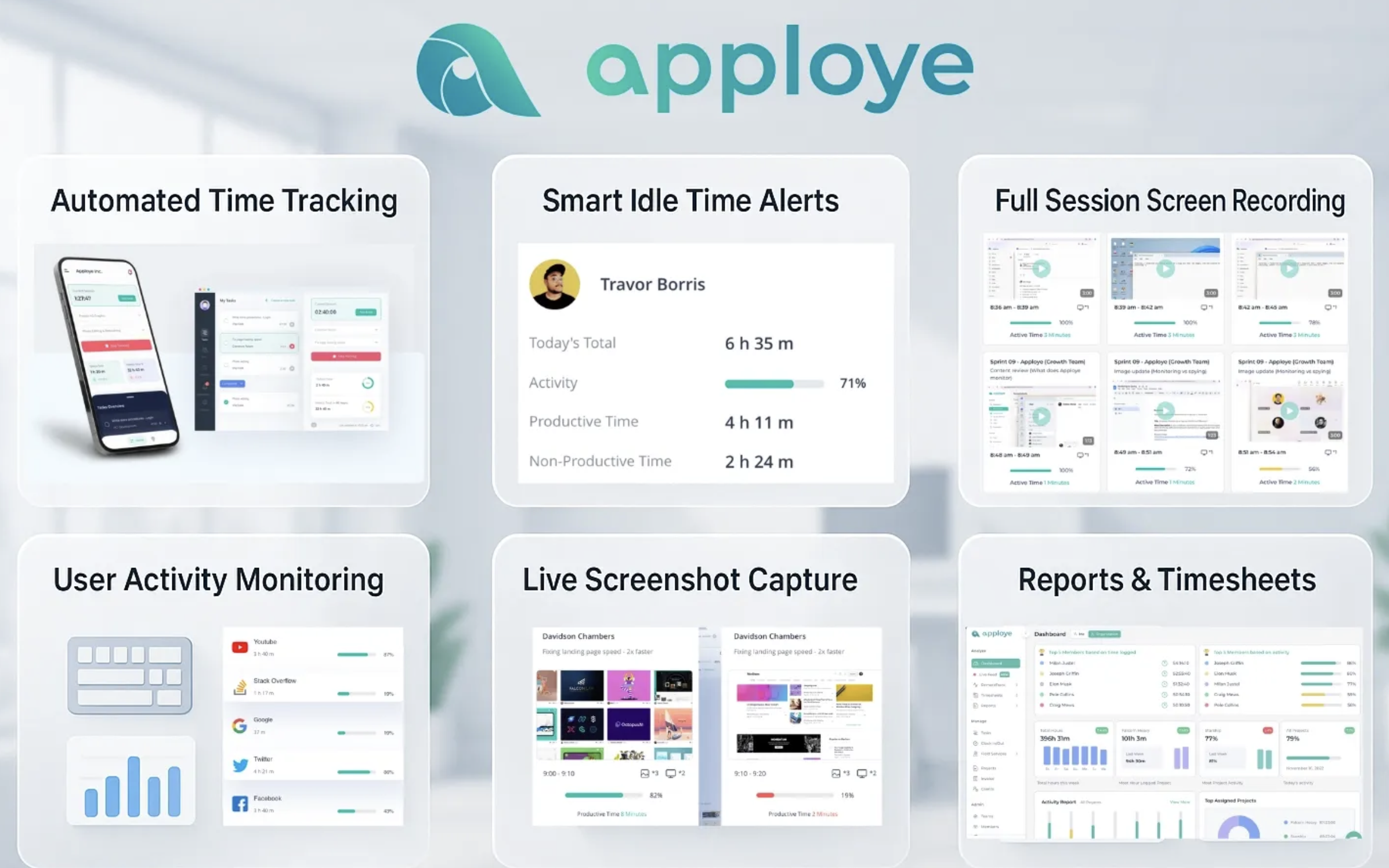
Project managers need accurate hours, clear budgets, and honest progress data to run delivery well. Time tracking and employee monitoring software supplies those numbers when teams work across locations and time zones. Apploye is one of the more widely reviewed options, with about 4.7 on G2 and 4.8 on Capterra.
Apploye is an employee monitoring software for project managers that combines timers, timesheets, project budgets, and activity reports under one umbrella. Plans start free for up to 10 users, with paid plans from $4.50 per user per month on annual billing.
Read on to see how its features work in project delivery, why you should consider it, and what positives and negatives we found.
Quick Answer: Why Apploye Works Well for Project Managers
Apploye is a strong choice for project managers because it joins Apploye time tracking, timesheet approvals, project budgets, activity monitoring, and client billing in one affordable platform.
Assign tasks, set budgets, and track hours against them without switching tools. Reports show activity levels across apps and websites, so you can plan workloads with facts, not guesses.
Integrations with Asana, ClickUp, Trello, and Jira keep timers inside the boards your team already uses. The Starter plan is free for up to 10 users, and paid plans begin at $4.50 per user monthly on annual billing. Setup is quick, and the 10-day free trial needs no credit card.
Desktop, mobile, and browser apps cover Windows, macOS, Linux, iOS, and Android. That mix of cost, coverage, and project-focused reporting is why Apploye suits remote and hybrid delivery teams.
Apploye Review: One of the Best Employee Monitoring Tools for Project Managers
In this Apploye review, we tried to build around one idea: the hours your team logs should connect directly to projects, budgets, and clients.
In the following sections, we explained what the platform is, what each feature does, what it costs, and where it fits best. Each part is written for a project manager who needs reliable numbers more than flashy dashboards.
What Is Apploye?
Apploye is an employee monitoring software that provides you with time-tracking, productivity reporting, and workforce management.
Teams use it to record work hours and activity, attach those hours to projects and tasks, and review activity data in clear reports. This software for employee monitoring lies in accurate hours, tidy timesheets, and visible budgets.
The product runs on Windows, macOS, and Linux desktops, and on iOS and Android phones.
You simply install the app, work offline, and it will sync all data to the cloud when online.
Each team member starts a timer, picks a project and task, and works as usual. The app records time, optional screenshots, and app and website usage based on the settings you choose for every person.
Apploye serves agencies, freelancers, remote teams, call centers, accountants, consultants, and engineering groups. That range matters because project work often spans several of those roles at once. It is one tool that handles hourly billing, internal budgets, and attendance, meaning fewer spreadsheets for you to maintain.
Public ratings show steady satisfaction, with about 4.7 on G2 and 4.8 on Capterra, where value for money also scores 4.8. Treat those numbers as context, because your own trial will tell you far more about how well the tool fits your workflow.
A First Week With Apploye
Here's how a typical first week unfolds for a project manager, based on how the platform is designed to work. Think of it as a walkthrough, not a diary.
● Day one: You set up your first project and invite your team. You also choose activity settings for each person, such as whether screenshots are on and how often they're captured.
● Day two: Your team installs the desktop or mobile app and starts timers against tasks. Nobody needs to learn a new planning method. They pick a task and begin.
● Midweek: You open the dashboard and watch hours land against project budgets. Activity reports begin to fill in.
● Friday: Timesheets are ready for approval, and you compare hours used with hours planned. The question that opened this article, where the week's hours went, now has an answer.
Apploye Key Features in Detail
The Apploye features are grouped into time tracking, productivity tracking, workforce management, analytics, and project management.
We have discussed every feature in detail as per Apploye's claims and our user experience.
Hope this breakdown will help you to find how the features work in real life.
Time Tracking and Timesheets
Time tracking is one of the core platforms of Apploye. You can run the timer from the desktop, mobile, or browser app, and can add manual time with notes when you forget to start it.
Idle time detection flags stretches without activity, while a Pomodoro timer helps people work in focused blocks. You can set daily and weekly work limits to avoid overtime surprises.
Each entry can be marked billable or non-billable, which makes billable hours tracking straightforward for client work. This timesheet software collects those entries, supports approval workflows, and exports files for payroll or invoicing.
But if you expect something advanced in the free plan for keeping time tracking history, it may disappoint you a little. On the free plan, timesheet history is limited to one month. But still, this is a huge jump up compared to other top tools in the industry.
Screenshots and Activity Tracking
This is where Apploye overlaps most with employee monitoring software, so it helps to know exactly what you get. Screenshots are captured at plan-based intervals: one per hour on Starter, up to 18 on Elite, and up to 60 on Power.
Members can add notes to a screenshot, and managers can request an instant one when needed. By the way, if you think the screenshot is mostly surveillance, you can set the limit which won’t bother your employees.
App and URL tracking shows where hours go, and productivity levels turn that into a simple view of focus. Starter limits this to three applications and five websites per day. Elite and above add a real-time active view that shows who is working right now.
The activity tracking is another core feature of Apploye, where you can see whether your paid hours are utilized by your employees or if they misuse them.
Also, this helps you to understand how a project goes on, when, and what resources it needs to access for proper workflow, which helps you to set the strategy for future planning and give feedback
Per-user settings let you match the level of detail to each role, which keeps tracking proportionate. Automatic productive and unproductive app labels are listed as coming soon.
Project and Task Management
Here's where a project manager's day gets easier. You create projects, assign tasks and to-dos, and log time against each one, which makes Apploye a practical piece of project time tracking software.
Tasks are unlimited on every plan, and project budgets show hours used against hours planned. That turns project budget tracking into a quick daily glance instead of an end-of-month surprise.
Client billing ties hours to bill rates, so invoices reflect real effort.
The free plan allows three projects and three clients. This plan suits a pilot but feels tight for an agency.
Apploye centers on tasks, budgets, and billing, so pair it with a planning tool if you rely on dependency maps or Gantt charts.
Attendance, Leaves, and Workforce Management
Remote work blurs the line between a workday and a free evening. Apploye's attendance tools help you keep that line clear for everyone.
Attendance records show who worked and when. At the same time, daily and weekly limits keep hours within agreed boundaries, and time off and holiday settings help you plan capacity around leave.
A dashboard summarizes team activity, and team management tools assign roles to managers and admins. Expense tracking sits next to hours, so project costs include more than labor.
Together, these tools make Apploye useful as remote workforce management software, not only as a timer. Shift scheduling is listed as coming soon.
Reports and Workforce Analytics
Reporting turns raw hours into decisions.
● Apploye’s daily reports and weekly email reports keep you informed without opening the dashboard.
● Activity and productive time reports show how hours split between focused work and other activity, and categorized work time groups entries by type.
● Activity analytics adds trends across people and periods, which helps when you plan sprints or review capacity.
● Custom reports are available from the Elite plan upward and let you build views around the questions you ask most often.
Payroll, Invoicing, and Client Access
Month-end is when small tracking gaps turn into big headaches, and this is where Apploye takes some of the weight off you.
You set a pay rate and a bill rate for each team member, and the member summary page shows what each person logged.
Payroll history keeps past periods in one place, so you never rebuild last month's numbers from memory. When an invoice is due, it comes straight from tracked time.
Client access lets customers see the hours behind the bill, which means fewer awkward emails asking what they paid for. On long retainers, that openness builds real trust.
By the way, the Starter includes limited versions of invoices, client access, and payroll history, while Elite and above remove those limits.
Apps and Platform Support
Apploye offers desktop apps for Windows, macOS, and Ubuntu Linux, mobile apps on the App Store and Google Play, and a Chrome extension.
This coverage matters for mixed teams, because designers on Macs, developers on Linux, and coordinators on phones can all log time in the same account.
We found this super reliable and feasible since we have to work with multi-categorized contractors and employees.
Also, setting up Apploye is easier. The setup follows a familiar pattern: invite members, assign them to projects, choose activity settings, and let them install the app.
Integrations and API
Integrations connect Apploye with the tools your team already uses. Apploye integrates with top project management software like Asana, ClickUp, Trello, and Jira. So, your team can track time and integrate every single feature of the top project management software you are currently using without leaving those boards.
However, integrations are not included on the free plan. Developers can use the public API, which costs $1 per user monthly on Elite and comes included with Power and Enterprise.
Together, these options help you feed hours into dashboards, billing tools, or custom reports.
Security, Privacy, and Admin Controls
Apploye states that data is encrypted and that it records work activity only, not personal passwords or sensitive information.
Admin and team manager roles control who sees which reports.
Well, acting as a team management role, I couldn’t see the privacy credentials of our employees and contractors. For the client side, the claim is true.
But we can’t guarantee the developer side. We can just assume that this claim is also true, by the way.
The Enterprise plan adds single sign-on, account provisioning, a Business Associate Agreement, and HIPAA and GDPR compliance items, while on-premises hosting is offered as an add-on for teams of 100 or more users.
Whatever plan you choose, share a written tracking policy with your team so everyone knows what is recorded and who can view it.
Social Media Use and Distraction Tracking
Social platforms are a common source of lost focus on remote and hybrid teams, and project managers often notice the effect only when deadlines slip.
Along with Apploye’s app and URL tracking, Apploye’s employee social media monitoring software shows how much working time your employees waste or surf on social media.
That helps you see whether distraction is a real pattern or just an assumption. As with all activity data, explain to your team what is recorded and why, and focus on workload and project outcomes rather than individual minutes.
Apploye Pricing in Detail
The Apploye pricing model is per user, with three billing cycles. Annual billing carries the lowest rate, and you can switch plans later, with changes taking effect immediately. The table shows list prices per user per month.
| Plan | Annual billing | Quarterl y billing | Monthly billing | Best for |
| Starter | Free | Free | Free | Individuals and teams of up to 10 users |
| Elite Power | $4.50 $8 | $6 $10.50 | $7 $12 | Growing teams that need integrations and reports Teams that need more screenshots and API access |
| Enterpri se | Custom Custom | Custom | Large organizations with security needs |
Optional add-ons change the final bill. More Screenshots costs $2 per user monthly on Elite, Screen Recording costs $4, and API Access costs $1.
White labelling and on-premise hosting cost $3 per user monthly and require at least 100 users. A Stealth App add-on costs $2, though you should use it only where your tracking policy and local rules allow it. BigQuery analytics costs $1,000 per organization monthly.
Every plan starts with a 10-day free trial that needs no credit card. Billing is per employee, and the account owner is free, so a 15-person organization pays for 14 users. Payments run through Paddle and accept major cards, PayPal, Apple Pay, and Google Pay.
A 30-day money-back guarantee applies, and optional one-time services include $150 dedicated onboarding and $200 data migration.
For a team with ten paid users on Elite with annual billing, the list price is $45 per month. That is a low monthly cost for a tool that covers timers, reports, and billing.
Apploye Pros and Cons
No tool fits every team, so a balanced view helps. We summarise the review with these Apploye pros and cons, which reflect how the platform behaves for project-focused work.
Pros
● Low entry cost. The free plan covers up to 10 users, and Elite starts at $4.50 per user monthly on annual billing, which keeps budgets predictable.
● Project-focused structure. Hours link to projects, tasks, budgets, and clients, so you can compare effort against plan without exporting data first.
● Broad platform coverage. Windows, macOS, Linux, iOS, Android, and Chrome apps let teams with mixed devices use the same tool.
● Flexible tracking depth. Per-user activity settings and plan-based screenshot frequency let you choose how much detail fits each role.
● Useful integrations. Asana, ClickUp, Trello, and Jira connections keep time data close to where tasks already live.
● Transparent pricing. Plan limits, add-ons, and services are published openly, so you can estimate costs before you talk to sales.
● Easy trial. The 10-day trial needs no credit card, and the 30-day money-back guarantee lowers the risk of a wrong choice.
Cons
● Free plan limits. Starter restricts projects, clients, tracked apps and websites, and history length, so growing teams will outgrow it quickly.
● Add-ons raise the bill. Screen recording, extra screenshots, and API access cost extra on Elite, which can narrow the price gap with other tools.
● Light project planning. Tasks, budgets, and billing are covered, but you will need another tool for dependencies, Gantt charts, or resource planning.
● Field work needs another product. Location-based job tracking is handled by a separate Apploye product, not by the main platform.
Who Is Apploye Best For?
Apploye fits some teams better than others. Use the lists below to see where it performs strongly and where you may want another option.
Best for
● Agencies and consultancies that bill clients by the hour and need clear records behind each invoice.
● Remote and hybrid project teams that want shared visibility into hours, progress, and capacity across time zones.
● Small teams and freelancers who can use the free plan for up to 10 users and upgrade when needs grow.
● Outsourcing and virtual assistant providers that report hours to clients and use screenshots and activity
summaries as supporting evidence.
● Teams using Asana, ClickUp, Trello, or Jira that want time data attached to existing tasks.
● Call center and support leaders who need attendance, limits, and productivity reports in one place.
May not fit
Apploye may not suit teams that need advanced project planning, deep resource scheduling, or location-based field tracking. It also fits poorly where leaders prefer to collect no activity data at all, because the platform's strengths come from capturing and reporting that information.
A practical test is to run the 10-day trial with one real project and one small group. Compare tracked hours with your own
estimates, check how the reports support your weekly review, and ask the team for feedback.
Final Words
Apploye earns its place among the best employee monitoring software and time tracking options by keeping the focus on project outcomes. Timers, timesheets, budgets, billing, and reports sit in one platform, and the pricing stays approachable for small and mid-sized teams.
The main trade-offs are limited free-plan capacity, paid add-ons, and lighter project planning than dedicated tools. If your team works remotely, bills by the hour, or needs clearer capacity data, Apploye deserves a place on your shortlist.
Start with the free plan or the 10-day trial, agree on tracking rules with your team, and judge the results against your own projects.
 AI tools to find & convert leads.

