
We've all been there. Staring at a 50 page report with a deadline looming, desperately trying to find that one crucial statistic buried somewhere in the middle.
Documents rule our professional lives. Reports. Proposals. Research papers. Contracts. White papers. The pile never stops growing, and there's never enough time to read everything thoroughly.
The average knowledge worker spends roughly 2.5 hours daily searching for information. That's over 30% of the workday lost to hunting through files and documents.
Something needs to change. And fortunately, it is.
New approaches to document interaction are helping professionals work faster and smarter. Instead of drowning in pages, people are finding ways to extract exactly what they need without wasting hours on manual searching.
This article explores practical strategies for conquering document overload. We'll cover workflow improvements, tool options, and mindset shifts that can reclaim your time and sanity.

Let's quantify the problem before solving it. Document overload isn't just annoying. It's genuinely expensive.
Consider math. If you spend 30 minutes daily searching through documents, that's 2.5 hours weekly. Over a year, you've lost more than 100 hours to finding information you already have somewhere.
Now multiply that across a team. Ten people losing 100 hours each means 1,000 hours of collective productivity vanishing annually. At average professional salary rates, that represents serious money.
But direct time loss is only part of the story. There's also the cognitive cost.
Every interruption to search for information breaks your focus. Research suggests it takes over 20 minutes to fully regain concentration after a distraction. Those "quick" document searches actually fragment your entire day.
Then there's the quality issue. When you can't find information efficiently, you make decisions with incomplete data. Important details get missed. Opportunities slip through cracks. Mistakes happen that better information would have prevented.
The frustration factor matters too. Few things drain motivation like spending an hour looking for something you know exists but can't locate. That frustration compounds over time, affecting job satisfaction and performance.
Most professionals still manage documents the way they did fifteen years ago. Folders. File names. Basic search. Maybe some tags if they're particularly organized.
These methods worked reasonably well when document volumes were smaller. They break down completely at today's scale.
Folder structures become unwieldy fast. Where does a competitive analysis go? Marketing? Strategy? Research? The "right" location is often ambiguous, leading to inconsistent filing and duplicate copies scattered everywhere.
File naming conventions help but require discipline that's hard to maintain. One team member uses dates first. Another uses project names. A third abbreviates everything. Good luck finding anything six months later.
Basic search catches keywords but misses context. Searching a financial document for "growth" might return fifty matches. You still need to read through each one to find the specific insight you actually need.
Cloud storage improved accessibility but didn't solve the fundamental problem. Having documents available everywhere means little if you still can't find and extract what you need from them.
The core issue is that traditional tools treat documents as static objects. You store them. You retrieve them. You read them manually. There's no intelligence in the interaction.



Before diving into specific tools, let's establish a smarter framework for thinking about document workflows.
Effective document management has three layers: organization, retrieval, and extraction. Most people focus heavily on organization while neglecting the other two. That’s backwards. A well-implemented document management system ensures that all three layers work together seamlessly, improving efficiency and accessibility across the organization.
Organization matters, but perfect filing systems are impossible to maintain. Instead, invest minimally in "good enough" organization and heavily in retrieval and extraction capabilities.
Retrieval means finding relevant documents quickly. This goes beyond basic search to include smart filtering, tagging, and discovery features that surface what you need based on context.
Extraction is where the real value lives. Once you've found a relevant document, how quickly can you pull out specific insights? This is where modern tools are making the biggest difference.
Think about your actual workflow. You rarely need to read entire documents. You need specific information: a statistic, a quote, a methodology, a conclusion. Optimizing for extraction transforms how productively you interact with content.
Not all documents deserve equal attention. Adopting a triage approach helps allocate your reading time wisely.
Some documents require deep reading. Strategic plans. Important contracts. Materials directly affecting major decisions. Give these full attention.
Many documents need only skimming. You're looking for specific sections or confirming particular details. Don't read word by word when scanning serves the purpose.
Other documents just need to be queryable. You might never read them fully but need to access specific information on demand. Having the ability to search and extract from these without reading transforms how you handle reference materials.
Categorizing incoming documents by attention level prevents wasting deep focus on content that doesn't warrant it.
Project management tools, in particular, have become integral to this evolution, alongside specialized document analysis software. Options exist now that genuinely transform how professionals interact with content.
Leverage Social Media: Use platforms like Instagram, TikTok, or even Twitter to share your thoughts. When you start posting, it will feel like you’re chatting with friends instead of marketing!
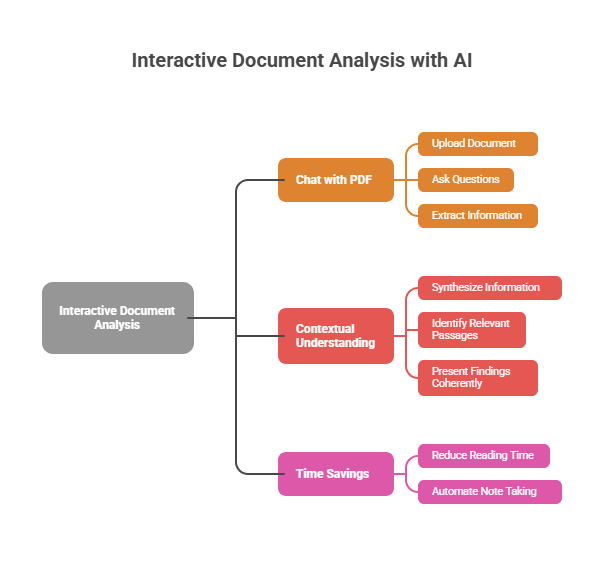
The biggest shift is toward tools that let you interact with documents conversationally. Instead of reading through pages, you ask questions and get answers.
Solutions that let you chat with pdf files represent this evolution perfectly. Upload a document, ask what you need to know, and get relevant information extracted automatically.
This changes everything about how you handle long reports and dense materials. Need the key findings from a 100 page research study? Ask directly. Want to understand how a contract handles a specific scenario? Query it. Looking for mentions of a particular topic across a document? Just ask.
The technology understands context, not just keywords. It can synthesize information, identify relevant passages, and present findings coherently. The time savings are substantial.
For professionals regularly dealing with lengthy documents, this capability is transformational. What once required an hour of reading and note taking happens in minutes.
Beyond individual document interaction, improved search and discovery tools help surface relevant content across your entire document library.
Modern search goes beyond simple keyword matching. Semantic search understands meaning and context. Search for "revenue projections" and find documents discussing "financial forecasts" or "income estimates" even if they never use your exact phrase.
Some platforms learn from your behavior over time. Documents you access frequently or materials related to your current projects surface more prominently. The system adapts to how you actually work.
Automatic tagging and categorization reduce manual organization burden. Documents get classified based on content, making retrieval easier without requiring meticulous filing.
Sometimes you do need to read documents carefully. Better annotation tools make that process more productive.
Modern annotation goes beyond simple highlighting. You can add searchable notes, create linked references between documents, and build structured summaries as you read.
Shared annotation helps teams work together. Multiple people can review the same document, adding observations and questions that everyone can see. This prevents duplicate reading and surfaces collective insights.
Some tools extract annotations automatically into summaries. Your highlights and notes become a condensed version of key points, accessible without reopening the full document.
Tools matter, but how you use them matters more. These workflow strategies maximize the impact of better document capabilities.
Context switching kills productivity. Jumping between reading documents, writing emails, and attending meetings fragments your attention constantly.
Batch your document work instead. Set dedicated time blocks for processing incoming materials. Review everything that's accumulated, triage by attention level, and handle similar tasks together.
This approach builds momentum. Your brain stays in "document mode" rather than constantly shifting gears. You'll process more material in less time with better retention.
Documents contain information. Information becomes useful when it connects to what you already know and what you're working on.
Develop a system for capturing and linking insights from your reading. This might be a note taking app, a personal wiki, or even a structured document. The format matters less than the habit.
When you extract something valuable from a document, add it to your system. Link it to related concepts. Note the source for future reference. Over time, you build a personal knowledge base that compounds in value.
This transforms passive reading into active learning. You're not just consuming documents; you're building a resource that makes future work easier.
Many document tasks repeat with variations. Client research follows similar patterns. Competitive analysis covers consistent categories. Report reviews look for standard elements.
Create templates that guide these recurring workflows. Checklists of questions to answer. Frameworks for organizing findings. Standard formats for summarizing conclusions.
Templates prevent reinventing approaches each time. They ensure consistency and completeness. And they make it easier to delegate document tasks when needed.
Understanding better approaches is one thing. Actually implementing them is another. Here's how to make the transition practically.
Don't try to overhaul your entire document workflow at once. Pick one specific pain point and address it.
Maybe that's handling research reports for a particular project. Or processing the weekly reading you never get through. Or managing reference documents you frequently search through.
Focus your initial efforts on this bounded area. Learn what works. Build new habits. Then expand to other areas once you've established momentum.
Before changing anything, understand your starting point. Track your document interactions for a week.
How much time do you spend searching for files? What types of documents consume the most attention? Where do bottlenecks occur? What information do you look up repeatedly?
This audit reveals where improvements will have the biggest impact. It also provides a baseline for measuring progress.
The best tool for you depends on your specific work. Experiment before committing.
Most document productivity tools offer free trials or limited free tiers. Test options with real documents from your actual workflow. See what feels natural and delivers genuine time savings.
Pay attention to integration with your existing systems. A great tool that doesn't fit your workflow creates friction that undermines its benefits.
The ability to chat with pdf documents and interact with content conversationally is worth prioritizing. This capability addresses the extraction challenge that often represents the biggest time sink.
If you work with others, individual improvements only go so far. Team alignment multiplies the benefits.
Share discoveries about what's working. Establish common approaches to document organization and naming. Create shared templates and processes that everyone follows.
Team wide adoption prevents the chaos that comes from everyone doing things differently. It also means insights can flow between people more easily.
Zoom out for a moment. What we're really talking about is treating information as a strategic asset rather than a burden to manage.
Every document crossing your desk contains potential value. Market insights. Competitive intelligence. Technical knowledge. Strategic frameworks. The question is whether you can access and apply that value when it matters.
Organizations that extract insights efficiently outperform those that don't. They make better decisions because they have better information. They move faster because they don't waste time searching. They see patterns others miss because they can actually process what they have.
The same applies individually. Professionals who manage information effectively accomplish more with less effort. They build expertise faster. They contribute more valuable insights. Their work stands out because it's better informed.
Document productivity isn't about handling paperwork. It's about becoming a more effective professional.

Document overload is real, but it's not inevitable. The tools and strategies exist to transform how you interact with information.
The key shifts are straightforward. Move from passive storage to active retrieval. Prioritize extraction over organization. Use tools that let you interact with content rather than just read it.
Start somewhere specific. Experiment with new approaches. Build habits that compound over time.
The hours you currently lose to document searching can be reclaimed. The frustration of hunting for information can become a memory. The insights buried in your files can surface when you actually need them.
Your documents aren't going away. But drowning in them is entirely optional.
 AI tools to find & convert leads.
  Send emails at scale

