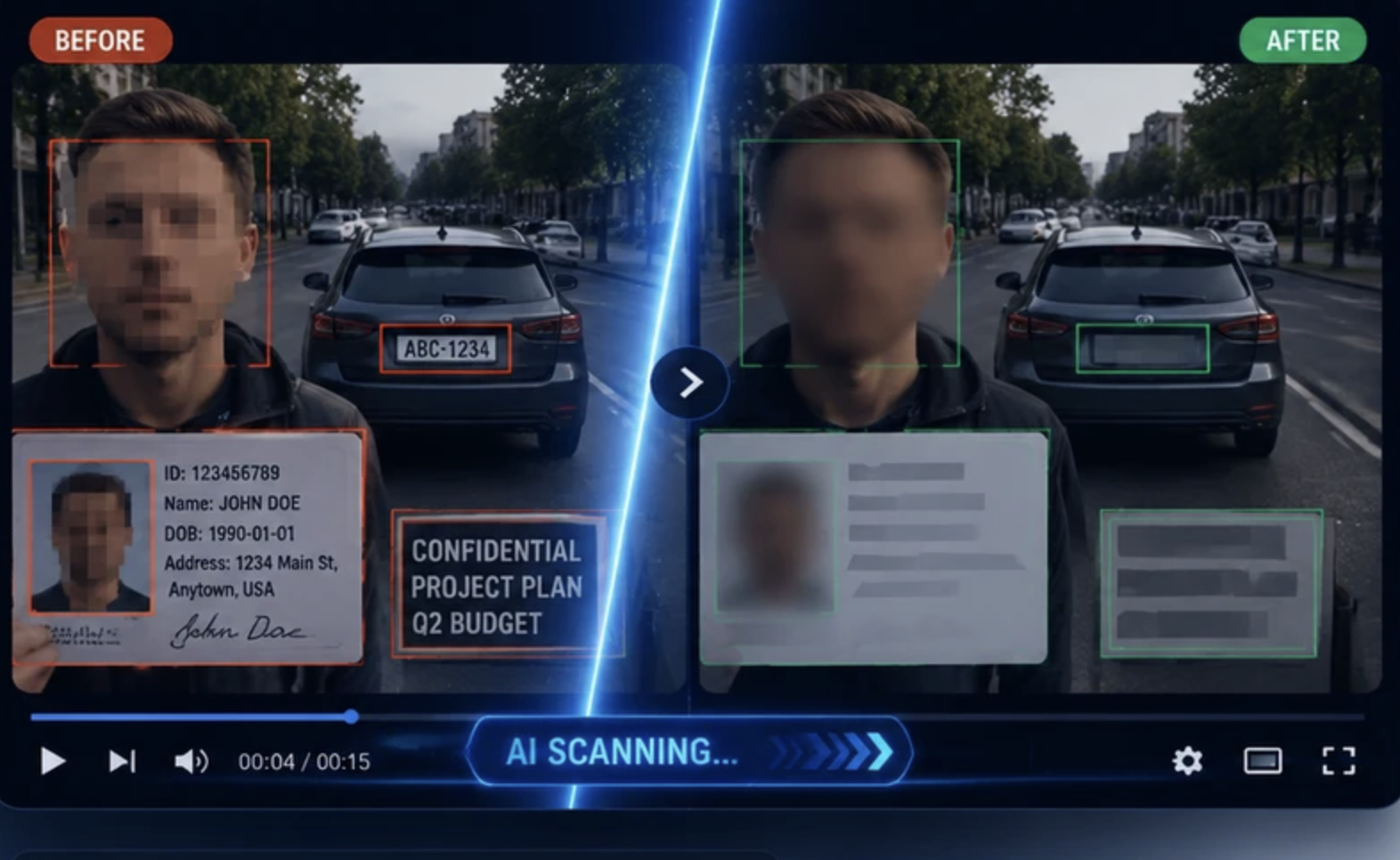
Sharing video securely is not just about using a protected link or encrypted transfer. If the footage itself contains faces, number plates, ID badges, computer screens, paperwork, addresses or other personal details, the real risk is often inside the file rather than in the method used to send it.
That is where video redaction tools come in. They help organisations create a version of the footage that can be shared with clients, legal teams, insurers, investigators or external partners without exposing information that should stay private. For many teams, that is far more practical than trying to blur every sensitive detail by hand in a standard editing program.
Choosing the right tool can be difficult, though. Some platforms are designed for privacy-first workflows and recurring compliance tasks. Others are better for manual editing, one-off cases or high-volume anonymisation. The best fit depends on what you are sharing, how often you do it, and how much review control you need before the file leaves your organisation.
In the comparison below, we look at seven video redaction tools that can help you share sensitive video securely. The ranking focuses on suitability for redacting private information before external sharing, rather than general video editing features.
| Rank | Name | Best For | Key Features |
| SecureRedact.ai | Secure sharing of sensitive footage | AI-assisted video redaction, privacy-first workflow, share-ready outputs | |
| 2 | CaseGuard Studio | Investigations, legal and evidence work | Video, audio, image and document redaction, desktop software, detailed review controls |
| 3 | Axon Redaction Assistant | Public safety and evidence-led video workflows | Redaction for digital evidence, useful for body-worn and incident footage, fits structured review and sharing workflows |
| 4 | Brighter AI | Large-scale anonymisation projects | Face and number plate anonymisation, API-led workflows, useful for mobility and public-space footage |
| 5 | Sighthound Redactor | CCTV and surveillance teams | Automated redaction, object tracking, practical workflow for security footage |
| 6 | Adobe Premiere Pro | Manual redaction alongside video editing | Motion tracking, masks, blur effects, strong editorial control |
| 7 | DaVinci Resolve Studio | Post-production teams handling sensitive clips | Advanced tracking, masking tools, high-quality finishing and exports |
SecureRedact.ai is a strong starting point if your main goal is simple: create a version of sensitive footage that can be shared safely without exposing private details. Unlike general-purpose editors, it is positioned around the redaction problem itself, which makes it especially relevant for teams handling incident footage, internal investigations, insurance evidence, workplace recordings or client-facing video disclosures.
What makes it stand out in this list is its fit for secure sharing workflows. Instead of treating redaction as a secondary editing feature, it focuses on obscuring the identifying details that can cause risk when footage is sent outside your organisation. For many users, that is the practical difference that matters. If the challenge is protecting faces, number plates, screens or visible paperwork before export, a purpose-built redaction tool is usually easier to work with than a full editing suite.
It is particularly suitable for businesses and operational teams that need repeatable, efficient results rather than creative video production features. If your process involves keeping the original footage internally while producing a safer version for external viewing, SecureRedact.ai feels well aligned with that use case.
AI-assisted video redaction
Designed for obscuring sensitive visual information before sharing
Privacy-focused workflow rather than general video editing
Useful for creating reviewable, share-ready outputs
Choose SecureRedact.ai if your priority is reducing the risk of exposing personal or confidential information when sharing video. It is the most relevant option here for organisations that want a tool centred on privacy protection first, rather than editing extras.
Visit SecureRedact.ai


CaseGuard Studio is one of the better-known names in redaction software, particularly for evidence-heavy environments. It is not limited to video either, which can be useful if your workflow also includes audio files, images and documents. That makes it a practical option for legal teams, investigators, compliance officers and public sector users dealing with mixed case files.
One of its main strengths is control. Desktop-based redaction software can appeal to teams that prefer to process sensitive material locally rather than relying entirely on a cloud workflow. It also tends to suit users who need careful frame-by-frame review and the ability to make manual adjustments where automatic detection is not enough. That matters when the footage is high risk or likely to be scrutinised later.
CaseGuard Studio is not the lightest option for occasional users, and there is a learning curve compared with simpler platforms. Still, if your organisation handles formal evidence or needs redaction across several media types, it is one of the most complete options in the market.
Video, audio, image and document redaction
Desktop-based workflow
Automatic and manual redaction controls
Suited to evidence and case-related material
CaseGuard Studio is a sensible choice for users who need more than fast face blurring. If your work involves investigations, subject access requests, legal disclosure or multi-format evidence, its broader redaction toolkit can make the process more manageable.
Visit CaseGuard Studio
Axon Redaction Assistant is worth considering if your video redaction work sits inside a broader evidence-handling process. Axon is well known in public safety and digital evidence workflows, so this option is particularly relevant for organisations managing body-worn video, in-car footage or incident recordings that may later need to be reviewed and shared with external parties.
Its main appeal is workflow fit. Rather than treating redaction as a standalone editing job, Axon’s redaction tools make more sense where footage is already being handled as formal evidence. That can be useful for teams that need clearer internal controls around review, sharing and retention, especially when multiple people are involved in deciding what can leave the organisation.
This will likely be a better match for structured operational environments than for occasional one-off users. If your team already works with evidence platforms and needs redaction to support disclosure or controlled sharing, Axon is a relevant alternative to more general editing software.
Video redaction within digital evidence workflows
Relevant for body-worn, in-car and incident footage
Useful for structured review and controlled sharing
Better suited to operational evidence handling than creative editing
Axon Redaction Assistant makes sense for teams that do not just need a blur tool, but a more joined-up evidence workflow. It is especially worth considering where redaction forms part of a wider process around review, governance and external disclosure.
Brighter AI takes a slightly different angle from some of the other tools in this list. It is especially well known for anonymisation, particularly faces and number plates, and is often associated with larger-scale privacy use cases such as mobility, automotive, mapping and public-space video datasets. If you are handling volume rather than just isolated clips, that positioning can be very useful.
Its strength is in preserving the usefulness of footage while reducing personal identifiability. That is important for companies that still need video to remain analytically valuable after redaction, whether for training data, fleet footage, street-level recordings or internal operational analysis. In those contexts, anonymisation quality matters just as much as simple concealment.
Brighter AI is less about editing a single evidential clip by hand and more about building privacy into data pipelines. So while it may not be the first choice for every legal disclosure task, it can be a very strong option for high-volume, privacy-led video processing.
Face and number plate anonymisation
Good fit for large-scale video workflows
API-led approach for operational deployment
Useful where footage still needs to remain usable after redaction
Choose Brighter AI if you need to anonymise large amounts of footage without making the video unusable for analysis. It is especially relevant where privacy protection needs to scale across ongoing video collection.
Visit Brighter AI
Sighthound Redactor is a practical option for teams dealing mainly with surveillance and security footage. CCTV and similar recordings often present a difficult redaction problem because people and vehicles move through the frame unpredictably, and manual blurring can quickly become time-consuming. A dedicated tool built for this kind of footage can save a lot of effort.
The main appeal here is its focus on operational redaction rather than full creative editing. Security teams, investigators and compliance staff usually want something that helps them identify and obscure sensitive elements quickly without learning a broadcaster-grade editing platform. For that use case, a more specialised redaction workflow is often a better fit.
It may not offer the same breadth as a multi-format investigations suite, and it is not a complete post-production environment. But for organisations whose main job is preparing surveillance clips for safe review or disclosure, it is a sensible option to compare.
Dedicated video redaction workflow
Useful for CCTV and surveillance footage
Automated tracking to reduce manual work
Designed for practical review and export
Sighthound Redactor is worth a look if your redaction work is mostly security or surveillance based. It sits in a useful middle ground between highly manual editing tools and larger enterprise privacy platforms.
Visit Sighthound Redactor
Adobe Premiere Pro is not a dedicated video redaction platform, but it is still used for redaction work because of its masking, motion tracking and blur tools. If your team already works in Adobe software and only needs to redact sensitive details occasionally, it can be a cost-effective and familiar way to handle the job.
Its biggest advantage is manual control. Editors can fine-tune masks, follow subjects through a shot and combine redaction with trimming, captions, sound work and final delivery in one place. That makes it useful when the footage also needs normal post-production treatment before it is sent on.
The trade-off is speed and risk. Premiere Pro is not built around privacy compliance workflows, and manual redaction can become slow on longer footage or clips with several moving subjects. It is best suited to lower volumes, careful users and situations where editorial flexibility matters as much as redaction.
Motion tracking and masking
Blur and concealment effects
Strong manual editing control
Useful when redaction is part of a wider edit
Choose Adobe Premiere Pro if you already have in-house editing capability and need precise manual redaction on a manageable number of clips. It is less suitable for bulk compliance work, but still effective in skilled hands.
Visit Adobe Premiere Pro
DaVinci Resolve Studio sits in a similar category to Premiere Pro: not a specialist privacy platform, but a very capable professional editor that can be used for redaction. Its tracking and masking tools can be effective for hiding faces, screens, documents or other moving elements when you need manual precision.
It is particularly attractive to post-production teams that already use Resolve for colour, editing and finishing. In that environment, redaction can be completed as part of the broader workflow instead of exporting clips to another system. For media teams or in-house video departments, that convenience can be valuable.
Like other general editors, however, it is not primarily designed for compliance-led redaction at scale. You need time, careful review and a disciplined checking process to make sure nothing is missed. For occasional or specialist cases, it works well. For large volumes of sensitive footage, dedicated redaction software is usually more efficient.
Advanced tracking and masking tools
Good for manual redaction tasks
High-quality finishing and export options
Useful for teams already working in Resolve
DaVinci Resolve Studio is a good option when redaction needs to happen inside an existing post-production workflow. It is best for experienced users who want control, not for teams seeking the fastest privacy-first solution.
Visit DaVinci Resolve Studio
The first question is what kind of sensitive information appears in your footage. In some videos, the problem is obvious, such as faces or number plates. In others, the real risk may be an employee badge, a whiteboard in the background, a patient record on a desk, a reflection in a window, or a laptop screen showing confidential information. Before choosing a tool, make a clear list of the types of details you actually need to remove.
It is also worth deciding whether you need automation, manual control or a mix of both. AI-assisted video redaction tools can save a lot of time, especially on long recordings or footage with several people moving through the scene. But fully automated results should still be reviewed by a person before the video is shared. If the footage is especially sensitive, frame-level checking matters. One missed section can undermine the whole process.
Another major factor is workflow. Some teams only need to redact the occasional clip, perhaps for HR, legal or customer service reasons. Others process video every day. If redaction is a frequent task, a dedicated platform will usually be more efficient than a general editing tool. If it is rare and handled by an experienced editor, software like Premiere Pro or DaVinci Resolve may be enough.
You should also think about where the footage is processed. Some organisations prefer desktop or on-premise style workflows because of internal data handling rules. Others want the speed and convenience of a cloud-based platform. For UK organisations, it is sensible to review how any provider handles storage, retention, access control and privacy obligations before uploading sensitive footage.
A common mistake is focusing only on the visible blur effect and ignoring the wider sharing process. Redaction is only part of secure video sharing. You also need to consider who can access the file, whether the original remains protected, whether the redacted version can be audited, and whether the exported video still contains metadata or audio that could reveal more than intended.
Finally, do not forget audio. Names, addresses, phone numbers and other identifiers are often spoken rather than shown. If your footage includes interviews, body-worn video, internal meetings or customer interactions, visual redaction alone may not be enough. In those cases, a tool with broader redaction support can make more sense than a video-only editor.
Video redaction is the process of obscuring sensitive details in footage before it is shared. This can include blurring or blocking faces, number plates, documents, screens, addresses, ID badges and other personal or confidential information.
Sometimes, but not always. A blurred face may not be enough if the clip still shows a number plate, spoken name, visible document or identifying location detail. The safest approach is to review the whole video for every type of information that could identify a person or expose confidential data.
They can save a lot of time, but they should not usually be trusted without review. AI can miss frames, unusual angles or partially visible details. For sensitive footage, human checking before export is still important.
That depends on your workflow and data handling rules. Cloud tools can be convenient for speed and collaboration, while desktop tools may suit organisations that want tighter local control over sensitive footage. The right choice depends on your internal policies, workload and security requirements.
Yes, but it is usually better for occasional jobs than for regular privacy workflows. Editors like Adobe Premiere Pro and DaVinci Resolve Studio offer precise manual control, but they are slower for high-volume redaction and do not typically provide a compliance-focused workflow.
At a minimum, check for faces, number plates, house numbers, ID badges, computer screens, printed documents and anything else that could identify a person. If the clip includes audio, listen for names, contact details and other personal information as well.
 AI tools to find & convert leads.
  Send emails at scale

