By Alex Rostovtsev, SEO & AI search specialist at Elfsight and Beamtrace
Someone is comparing your company with three competitors. They want to know what each product does, who it's for, what it costs, what it connects to, whether customers have evidence that it works, and whether its security claims hold up. Every answer has to come from what the companies have published. Could they finish the comparison without guessing?
That person is increasingly working with an AI assistant. In a Gartner survey of 645 B2B buyers, 45% said they used generative AI during a recent purchase, mostly to gather information on vendors and products, and 69% preferred to check AI-generated insights with a sales rep.
So your website is source material for someone else's comparison, and good source material has to do more than load.
Most advice about AI search starts with technical checklists: robots.txt, schema, crawler names, JavaScript rendering, llms.txt. Those can affect whether a page gets read, but for a B2B website I'd start with the questions a buyer needs answered.
What do you sell? The product or service and its main capabilities.
Who is it for? Audience, company size, use case, and industry where it matters.
How does pricing work? The price, or enough of the pricing model to understand it.
Which systems does it work with? Named integrations and what each one does.
What supports the claims? Customers, results, case studies, methodology.
Which security or compliance claims can a buyer verify? Specific standards, controls, certifications or policies.
Some of this you may keep private on purpose, and enterprise pricing is the obvious example. The question worth asking is whether you've published enough precise information to answer what you expect your market to ask.
Before judging the information, check that automated systems can retrieve the page at all. That takes more than an “allow AI bots” switch. OpenAI documents separate agents for separate jobs. OAI-SearchBot surfaces sites in ChatGPT search, GPTBot crawls content that may be used to train its models, and ChatGPT-User fetches pages when a user asks ChatGPT something. OpenAI also notes that robots.txt rules may not apply to that last one, since a user started the request.
A permissive robots.txt doesn't guarantee delivery either. CDN rules, bot protection, redirects and server behavior can return something different from what the crawler policy suggests.
For this article I ran six public B2B pricing, product and integration pages through BLURSOR's AI Readiness Audit, a free tool I built to check these layers separately. It sends its requests from its own servers with published crawler user agents, so it shows what a request like that receives, which isn't necessarily what a verified OpenAI or Anthropic crawler gets.
The results were calmer than the usual “AI can't read modern websites” story. Five of the six pages showed no technical blocker, JavaScript didn't hide their main content, and their raw and rendered text overlapped almost completely. The more interesting question was what survived extraction.


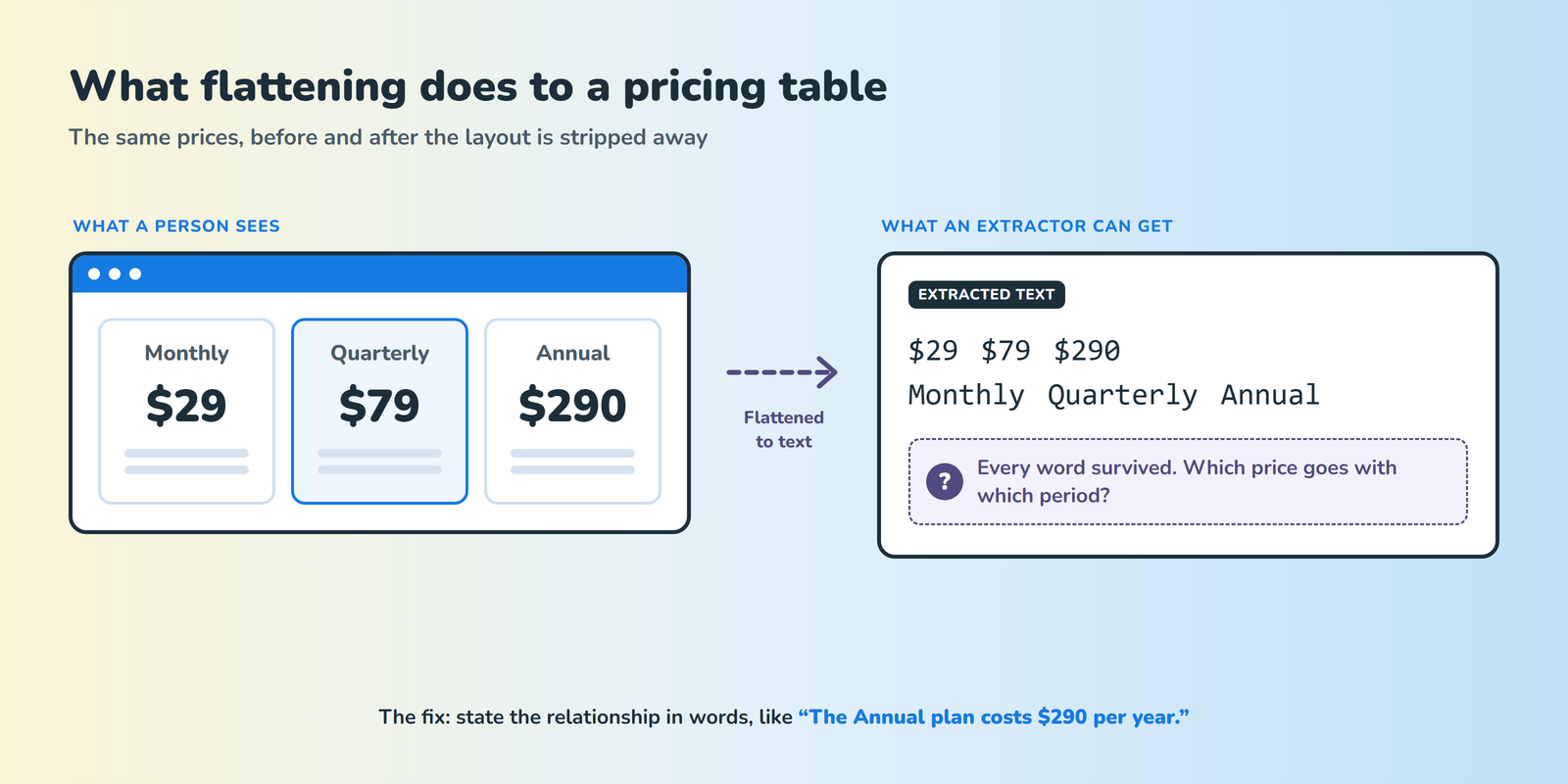
One pricing page in the test kept about 98% text overlap between its initial and rendered versions, which sounds excellent. But the page showed several prices for different billing periods, and once the layout was flattened into text, the numbers and labels survived while the connection between them got harder to follow.
A person looking at three columns, Monthly $29, Quarterly $79 and Annual $290, reads them instantly. Flattened carelessly, the same block can come out as “$29 $79 $290 Monthly Quarterly Annual”. Every word is still there, and nobody can tell which price goes with which period.
Google Drive image link: pricing-table-flattening.png
During an audit, I'd check three things separately.
Text survival: did the words make it through?
Relationship survival: is it still clear which value belongs to which plan, product, billing period or feature?
Answerability: can those facts support an actual buyer's question?
An overlap score speaks to the first and says nothing about the other two.
Interactive interfaces aren't a problem in themselves. Across the six pages, the ones that held up best stated their important relationships in words as well as in the layout.
Clay's pricing page is a good example. Its plan table carries a lot of detail, and some values change between monthly and annual billing, but the page also answers questions like “How do I pick the right plan?” in plain text in its FAQ.
If a fact depends on position, color, tabs or a toggle, say it in words somewhere too. “$49” is a number, while “The Growth plan starts at $49 per user per month” is a fact that keeps its relationship. The same applies beyond pricing. “Integrates seamlessly with your existing stack” is readable, and “The HubSpot integration syncs contacts and companies into the CRM” can answer a question.
Close's integrations directory shows the same thing. Each integration name sits next to a line about what it does, like Calendly's “Insert links, auto-create contacts, and sync bookings into Close”, so the page still makes sense as plain text. Its raw and rendered versions were also almost identical in the test. The design rule is simple: put the fact next to the thing it describes.
B2B websites use positioning language, and they should. It just answers different questions than evidence does.
| Positioning | Evidence |
| Built for fast-moving revenue teams | Designed for sales teams of 10 to 50 reps |
| Enterprise-grade security | SOC 2 Type II certified |
| Trusted by leading businesses | A customer story that names the company, explains what changed and gives a measurable result |
Both kinds of statement belong on the same site. Trouble starts when positioning is expected to do the job of evidence. The Gartner survey points the same way: buyers use AI to gather vendor information, and they still want a person to validate the claims that matter. Making a page better source material mostly means publishing better evidence for people.
Recent research on generative engine optimization treats visibility as a series of stages. A 2026 paper on diagnosing citation failures found that documents fail at different points in the retrieval-and-citation pipeline, that targeted repairs beat generic optimization, and that generic rewrites can even harm long-tail content.
The SAGEO Arena benchmark, also from 2026, tested optimization across the whole pipeline of retrieval, reranking and generation. Its authors found that existing techniques often hurt retrieval and reranking, and that structural information such as schema markup helped. A page has to be retrieved before its prose can matter, and being retrieved doesn't make the prose informative.
Structured data deserves the same restraint. Google's guidance on AI features is unusually clear here. It says SEO best practices remain relevant for AI Overviews and AI Mode, that important content should be available as text, and that structured data should match the visible text. It also says there's no special schema or AI text file you need to add to appear in those features.
So if your pricing is deliberately undisclosed, Product markup won't invent a price. If an integration page only says “connect your stack”, schema can't add the missing explanation, and a case study without evidence doesn't gain any from markup.
Another common mistake is treating AI readiness as a property of the whole domain. A homepage can be technically perfect while the information a buyer needs lives on the pricing page, a product page, the integration directory, the documentation, a case study or the security page, and each of those has a different job.
Start the audit with a question and follow it to the page that's supposed to answer it. If you want to know whether the product works with Salesforce, find the page responsible for that answer and check whether it gives one. A 200 status on the homepage tells you nothing about it.
You can make every important page accessible and state your products, prices, integrations and evidence precisely, and still not know whether your company comes up when someone asks an AI assistant about your category. That takes a separate measurement. A visibility tracker shows whether your brand appears in ChatGPT's answers for the prompts that matter to you, and competitor analysis shows which vendors it recommends instead.
Keeping the two measurements apart also keeps you honest about cause and effect. Fixing a crawler problem, adding schema or clarifying a pricing page doesn't guarantee a citation or a recommendation. It gives systems, and people, better material to work with.
You don't need a crawler to start. Open your website and answer these six questions using only public pages.
What exactly do we sell?
Who is it for?
What does it cost, or how does pricing work?
Which systems does it integrate with, and what do those integrations do?
What credible evidence supports our claims?
What security or compliance information can a buyer verify?
For each answer, note the page that supports it. Then flag every answer where you had to do any of the following.
Infer what the company meant.
Combine several vague claims.
Read a layout whose labels stop making sense without it.
Rely on information you know internally but haven't published.
Hunt through several pages for a basic fact.
Give up.
Then give the same exercise to someone who doesn't work at your company. You already know what your website means, and they don't. Neither do the systems helping buyers compare you.
A B2B website isn't a database dump, and some information belongs in a sales conversation, private documentation or a contract. The goal is narrower: publish enough precise, usable evidence for the questions you expect your market to ask.
Crawler access, clear structure and machine-readable signals all help. But if careful human research still requires guessing what your product does, how pricing works or what a claim means, making the page “more AI-friendly” probably isn't the first problem to solve.
 AI tools to find & convert leads.
  Send emails at scale

